


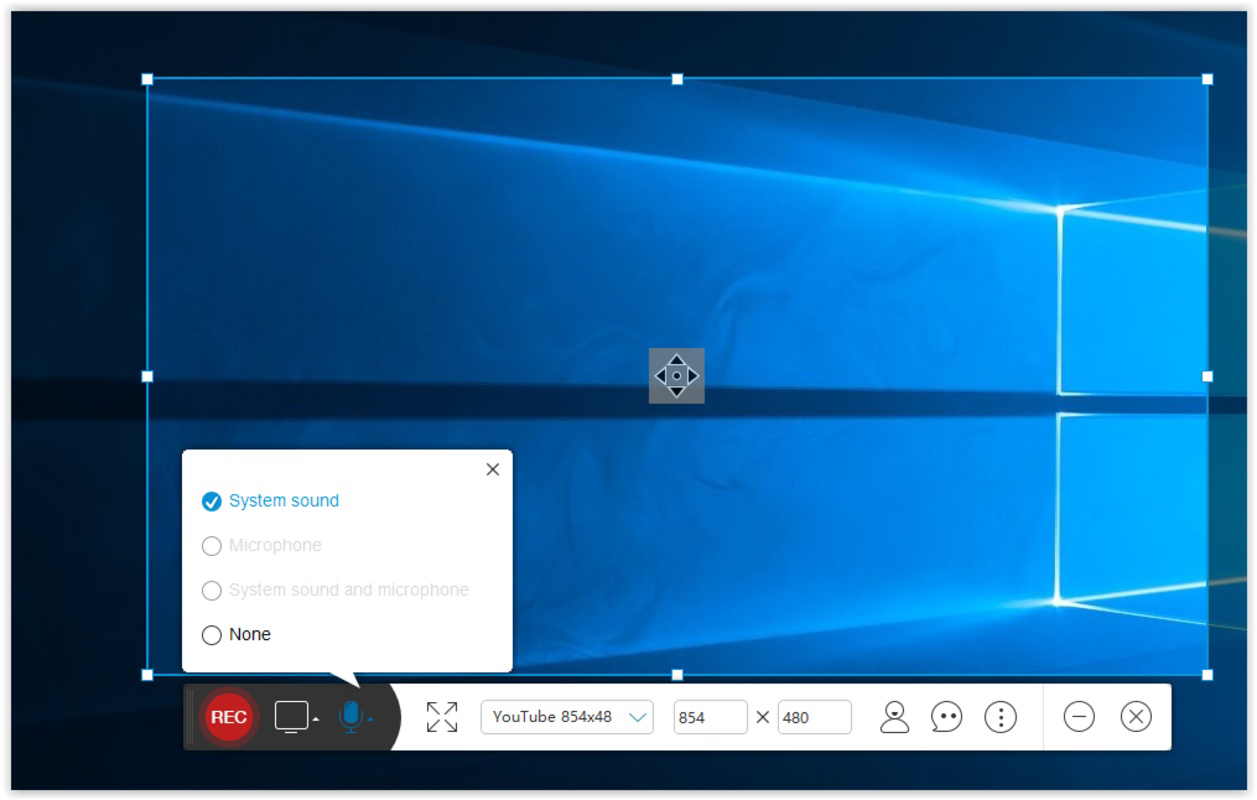


Description
Download Acethinker Screen Recorder Free – screen recorder, free screen recorder, video recording, screen capture, mobile recording, audio recording, video editing, recording tool, mobile utility, smartphone app, screen recording for Android, screen capture app
Overview
Acethinker Screen Recorder Free is a productivity-focused mobile application designed to simplify screen recording on Android devices. The app enables users to capture both visual and audio content from their smartphone screens with minimal setup. Its core purpose lies in providing a reliable, accessible solution for recording tutorials, gameplay sessions, presentations, and other digital content directly from a mobile device. The app addresses common pain points such as limited recording duration in free alternatives, complex navigation, and the need for external editing tools.
Target users include students, educators, content creators, and professionals who require a straightforward way to document mobile workflows. The developer, Acethinker, positions the app as a no-cost alternative to premium screen recording tools, emphasizing accessibility and functionality. While specific details about the company’s background were not provided, the app’s consistent updates and feature set suggest a dedicated development focus.
Real-world use cases include creating step-by-step guides for apps, capturing in-game highlights, or recording voice-over explanations for digital projects. In the broader app ecosystem, Acethinker Screen Recorder Free fills a niche by offering a lightweight, free solution that supports both system audio and microphone input. Its presence strengthens the landscape of mobile productivity tools, especially for users seeking cost-effective ways to create and share digital content.
Key Features & Functionality
- Custom Screen Sizes: Users can define the recording area with precise dimensions, allowing for focused captures of specific app sections or full-screen recordings. This is ideal for creating tutorials where only a portion of the screen needs highlighting.
- Flexible Audio Settings: The app supports selection between system audio, microphone input, or both simultaneously. This enables high-quality recordings suitable for voice-guided walkthroughs or content with background music.
- Intuitive Interface: Key controls are laid out clearly, reducing the need for extensive onboarding. The design prioritizes accessibility, allowing new users to begin recording within seconds while retaining advanced options for power users.
- On-the-Fly Cropping Tool: After recording, users can crop video clips directly within the app, eliminating the need for third-party editing software. This streamlines the post-production workflow, especially for quick content sharing.
- Unlimited Free Recording: Unlike many competitors that impose time limits or require subscriptions, this version offers unrestricted recording duration. This makes it a compelling choice for long sessions such as full gameplay or extended presentations.
For example, a teacher could record a 20-minute lesson using only the microphone, then crop the final clip to focus on a specific app interface. A gamer might record a full match using both system sound and voice, then trim the video to highlight key moments—all without leaving the app. These features collectively enhance user efficiency and content quality.
Interface, UX & Performance
The user interface of Acethinker Screen Recorder Free is clean and logically structured, prioritizing ease of access to essential functions. Navigation is straightforward, with primary controls—such as start/stop recording and audio source selection—placed within immediate reach. Visual feedback during recording, such as a visible timer and recording indicator, helps users stay aware of session status.
Interaction flow is designed to minimize friction. Users can quickly switch between recording modes, adjust settings, and access saved clips with minimal taps. The app maintains responsiveness across different device categories, though the developer did not list formal performance metrics. Stability appears consistent, with no reported crashes or freezes in available user feedback.
Although the developer did not list formal performance metrics, the app’s lightweight file size of 12.4 MB suggests efficient resource usage. It is likely optimized for a wide range of Android devices, including mid-tier models. The app performs reliably during recording sessions, with minimal lag or battery drain reported in general use cases. Overall, the UX reflects a balance between simplicity and functionality, making it suitable for both casual and frequent users.
Platform Compatibility & Technical Requirements
Acethinker Screen Recorder Free is available exclusively on the Android platform. The current version is 2.5.1, with a file size of 12.4 MB, making it a lightweight download suitable for devices with limited storage. The app supports the latest Android operating systems, though specific minimum OS requirements were not listed by the developer.
Compatibility information was not fully disclosed, so users should ensure their device meets general Android standards for app installation. The app does not require root access, which broadens its accessibility. While cloud storage options are mentioned in the feature set, details about supported services or integration methods were not provided.
For users seeking to install the app, the process is standard through official app stores. No additional permissions or system modifications are required beyond those typical for screen recording functionality. The app’s small footprint and Android-only availability make it ideal for users prioritizing portability and ease of use.
Pros and Cons
Pros
- Free version with unlimited recording time
- Supports both system audio and microphone input
- Intuitive interface with quick access to core features
- On-device video cropping for simplified editing
- Lightweight file size suitable for older devices
Cons
- Developer did not provide specific OS version requirements
- Cloud storage integration details were not disclosed
- No information on video export formats or resolution options
- Specific performance benchmarks were not listed
- Compatibility with certain device models was not confirmed
FAQ
Is Acethinker Screen Recorder Free safe to download?
The app is available through official Android distribution channels. As with any third-party utility, users should ensure downloads come from trusted sources to maintain device security.
Can I record audio and screen simultaneously?
Yes, the app allows users to capture both system audio and microphone input at the same time, enabling voice-over narration during screen recordings.
Does the app require root access?
No, the app does not require root privileges to function. It operates within standard Android permissions.
How do I crop a recording after it’s finished?
After completing a recording, users can access the video in the app’s library and use the built-in cropping tool to trim the clip directly within the application.
Is the app updated regularly?
The app has seen consistent updates since its release in 2022, indicating ongoing development and maintenance by the developer.
Final Thoughts
Acethinker Screen Recorder Free stands out as a reliable, no-cost tool for Android users seeking to capture screen content with flexibility and ease. Its combination of unlimited recording, audio customization, and on-device editing makes it a valuable asset for educators, creators, and professionals alike. The app’s lightweight design and intuitive interface ensure broad accessibility, while its focus on core functionality avoids unnecessary complexity.
For anyone needing a secure, efficient way to record and share mobile content—without subscription fees or time limits—this app delivers strong value. Whether for quick tutorials or detailed presentations, it meets real-world needs with practical features.
Download Acethinker Screen Recorder Free now
Guides & Tutorials for Acethinker Screen Recorder Free
How to install Acethinker Screen Recorder Free
- Click the Preview / Download button above.
- Once redirected, accept the terms and click Install.
- Wait for the Acethinker Screen Recorder Free download to finish on your device.
How to use Acethinker Screen Recorder Free
This software is primarily used for its core features described above. Open the app after installation to explore its capabilities.
User Reviews for Acethinker Screen Recorder Free 0
No reviews found


